DAY_03 / SECTION_02 // SCALE
MODULE READY
Distributed storage
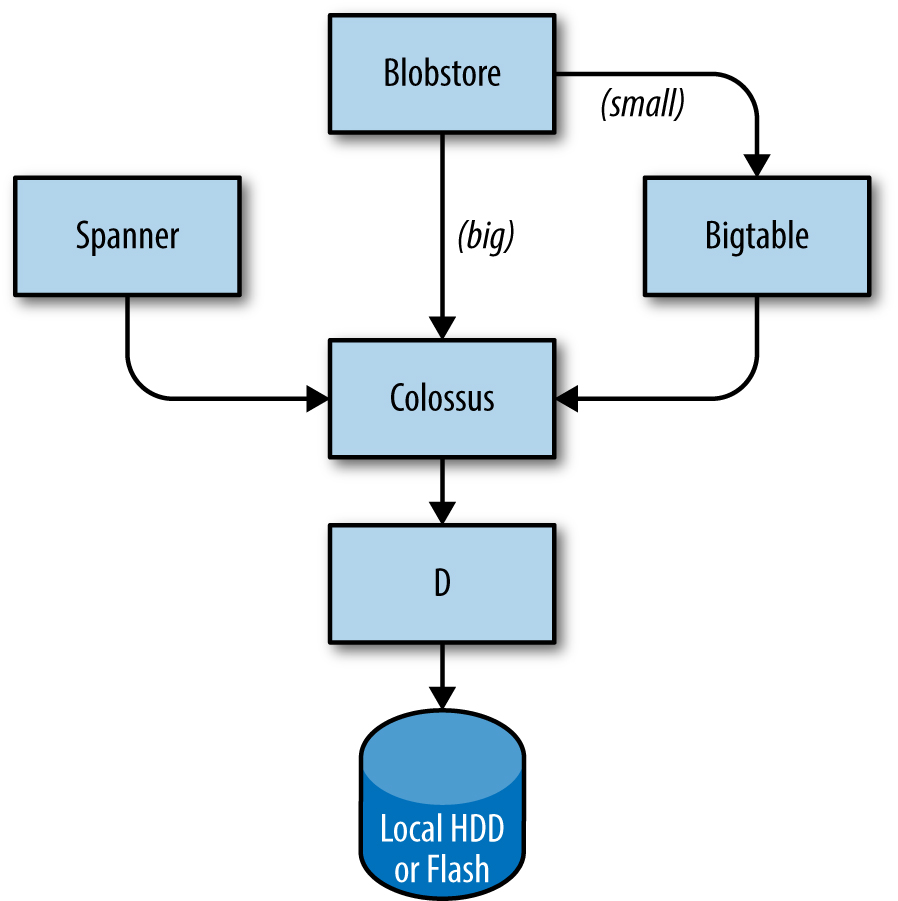
Storage stacks layer the same way regardless of provider — local disk → cluster filesystem → database services. Knowing the layers helps you pick the right tool and read postmortems.
LAYER_01
ONLINE
sd_card
Local
Disk on a single machine
Fast but vulnerable. Google's D — a fileserver on every machine.
spinning disks · flash · NVMe
LAYER_02
ONLINE
storage
Cluster FS
Many machines = one FS
Replication, encryption, FS-like semantics. Google's Colossus (after GFS).
AWS S3 · GCP Cloud Storage · Azure Blob
LAYER_03
STANDBY
database
Databases on top
Different trade-offs
Bigtable (NoSQL, petabyte) · Spanner (SQL, global consistency) · Blobstore.
DynamoDB · Aurora · Cosmos DB · …
// cloud equivalents
Bigtable wasn't an academic curiosity — it became the template for AWS DynamoDB and others. Knowing the lineage helps you pick.
| Layer | AWS | Azure | |
|---|---|---|---|
| FS | Colossus | S3 | Blob Storage |
| NoSQL | Bigtable | DynamoDB | Cosmos DB |
| SQL global | Spanner | Aurora Global | Cosmos DB / Azure SQL |
| Object | Blobstore | S3 | Blob Storage |
help Knowledge Check
Question 1/1 Your service runs in 3 regions, mostly reads. Latency matters more than write consistency. Which storage choice fits?
// pick one to verify
// explanation The trade-off triangle is latency vs consistency vs cost. Strong global consistency (Spanner) is expensive and slows down writes everywhere. Eventually-consistent regional replicas (Bigtable / DynamoDB Global Tables) keep reads local and accept that writes propagate. For read-heavy multi-region workloads, that's the win.